 button on the up-right corner。
Please refer to the instructions below to verify your ViaTalk software needs to be updated or not:
1. Plug your ViaTalk device, and run the software.
2. Click
button on the up-right corner。
3. Switch to [About] page。
4. Check the ViaTalk version is v1.0.2 or later。
5. If the version is older, please click the web link below to open PenPower's website, and choose your region to enter.
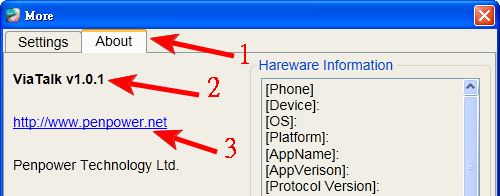
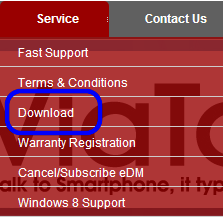
6. Find the [Download] page, and select the list item to ViaTalk, then download the latest version.

7. After downloading, please close ViaTalk software, then double click to execute the update file.
8. Please unplug the device to complete the update process once it is finished.
2013/12/24